Introduction
Many homes contain a mixture of modern smart devices and older appliances that were never designed to connect to a smart-home platform. A television may still use an infrared remote. An air conditioner may have its own handheld controller. A fan, projector, set-top box, or other appliance can require another remote, another set of batteries, and another control method.
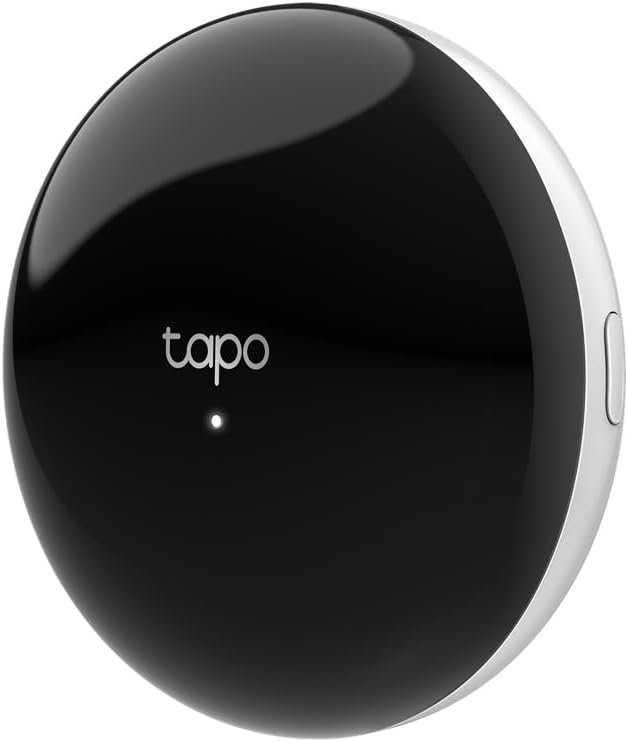
The Tapo H110 Smart IR & IoT Hub is designed to bring many of these traditional infrared-controlled appliances into a more connected smart-home environment. Instead of replacing every existing appliance with a new smart model, the H110 uses an integrated infrared transmitter to communicate with compatible IR devices while also serving as a hub for supported Tapo accessories. TP-Link describes the H110 as a Matter-certified connection center that can integrate supported IR appliances and Tapo sensors into compatible smart-home ecosystems.
The device is therefore different from a conventional smart plug. A smart plug controls the electrical power going to an appliance, while an infrared hub can send commands similar to those produced by an appliance’s original remote control. This distinction is particularly important for products such as air conditioners and televisions, where turning power on and off is only a small part of the available functionality.
The H110 can also connect to supported Tapo accessories through its low-power wireless connection and can participate in smart actions involving sensors and other compatible devices. TP-Link lists features such as scheduling, location-based control, voice control, app-based remote control, and offline control within the same local network.
Another important aspect is Matter support. Matter is designed to improve interoperability between smart-home ecosystems, and the H110 can expose supported devices and functions to platforms such as Apple Home, Google Home, Amazon Alexa, and SmartThings through compatible Matter controllers. The exact functionality available can depend on the appliance type, connected ecosystem, and current software support.
This makes the H110 an interesting category of smart-home accessory: it can connect traditional infrared appliances with newer IoT devices without requiring the appliances themselves to have built-in Wi-Fi.
This guide explains how the Tapo H110 works, its main features, practical applications, Matter integration, infrared compatibility, sensor automation, limitations, and the factors worth considering before adding it to a smart-home setup.
What Is the Tapo H110?
The Tapo H110 is a compact Smart IR & IoT Hub from TP-Link’s Tapo ecosystem.
It combines two primary functions.
The first is an infrared universal remote system. The built-in IR transmitter can send commands to supported appliances that normally use infrared remote controls.
The second is an IoT hub for compatible Tapo accessories. The H110 can communicate with supported low-power Tapo devices such as sensors and use their information as part of smart-home actions.
TP-Link’s current product information describes support for more than 8,000 brands and a range of appliance categories. The exact number of supported appliance types varies between regional product pages and documentation, so compatibility should be checked for the specific hardware version and appliance rather than assuming every IR product is supported.
The H110 uses 2.4 GHz Wi-Fi for network communication, while its supported Sub-1 GHz wireless connection is used for compatible Tapo accessories. Bluetooth is used for setup rather than as the primary communication method. TP-Link’s datasheet identifies 922 MHz for US and Japanese versions and 868 MHz for European versions.
The physical unit measures approximately 79 × 79 × 32 mm, making it relatively compact for placement near entertainment equipment or in another suitable indoor location. It is powered through USB-C using a 5V/2A power supply or an adapter capable of providing the required current. The current quick-start documentation notes that the USB adapter is not included.
Key Features
Universal Infrared Remote Control
The most distinctive feature of the H110 is its integrated infrared transmitter.
Many traditional appliances use infrared communication. When you press a button on a conventional remote, the remote emits an infrared signal containing the command. The appliance’s IR receiver interprets that signal and performs the requested action.
The H110 uses the same basic concept.
After a compatible appliance is configured in the Tapo app, the H110 can send supported commands to that appliance.
This can eliminate the need to keep several physical remotes within reach.
Depending on compatibility, the H110 can be used with categories such as:
- Air conditioners
- Televisions
- Fans
- Projectors
- Set-top boxes
- DVD players
- Air purifiers
- Humidifiers
- Robot vacuums
- Certain lighting products
- Amplifiers
- Electric heaters
- Other supported infrared appliances
TP-Link’s datasheet lists 18 IR appliance categories for the documented H110 hardware, while current regional marketing pages can list additional categories. This is one reason checking the product’s regional compatibility information is important.
Broad Brand Compatibility
TP-Link describes the H110 as supporting more than 8,000 brands of infrared appliances. The company’s product information also states that the compatibility database is updated periodically.
A large IR database is useful because infrared remotes can differ significantly between manufacturers and appliance models.
However, a large brand count should not be interpreted as a guarantee that every model from every listed manufacturer will support every command.
An appliance may support basic power and mode commands while offering more limited support for specialized buttons. This is especially relevant for air conditioners, which can have complicated remote-control states involving temperature, fan speed, operating mode, swing position, timers, and other settings.
The correct approach is to verify the exact appliance compatibility whenever possible.
Easy Appliance Pairing
TP-Link has designed the H110 setup process around the Tapo application.
The company explains that users can follow the app instructions, press buttons on the original appliance remote, and perform several button tests to pair the appliance.
This approach is useful when the exact appliance model is difficult to locate in a database.
Instead of relying exclusively on a model number, the pairing process can help identify and test the appropriate IR command set.
This can be particularly helpful for older appliances where documentation is no longer readily available.
Remote App Control
Once a compatible infrared appliance is configured, the Tapo app can provide a digital control interface.
This changes the experience from carrying multiple physical remotes to managing supported appliances through a smartphone.
For example, someone who has left home could potentially check the Tapo app and turn off a compatible air conditioner remotely, provided the system and appliance support the relevant function and the hub has the necessary connectivity. TP-Link specifically describes remote app control as one of the H110’s capabilities.
Remote access can be useful for appliances where forgetting to turn something off is inconvenient.
It is important, however, to distinguish remote command transmission from physical confirmation. With an infrared appliance, the H110 sends the programmed command; it does not necessarily provide independent confirmation that the appliance actually changed state.
Voice Control
The H110 can bring compatible IR appliances into voice-controlled smart-home environments.
TP-Link documents voice control through platforms such as Alexa, Google Assistant, and Siri, with commands varying according to the appliance type and integration method.
This can be useful when the original remote is misplaced or when controlling an appliance from across a room.
For example, a compatible television could be controlled through a supported voice assistant, while a supported air conditioner could respond to temperature or mode commands.
The available commands are not necessarily identical across every platform. Some appliance types may expose more functions than others.
Matter-Certified Smart-Home Integration
Matter is one of the H110’s most important smart-home features.
Matter is designed to provide a common standard through which compatible smart-home devices can communicate with ecosystems from different manufacturers.
TP-Link describes the H110 as a Matter-certified connection center capable of integrating supported IR appliances and Tapo sensors into Matter ecosystems.
The product documentation identifies support involving major ecosystems such as:
- Apple Home
- Google Home
- Amazon Alexa
- Samsung SmartThings
The exact setup requirements differ depending on the platform. A compatible Matter controller is required for Matter-based integration, and Apple Home setups can require an appropriate Apple Home hub such as a HomePod or Apple TV with compatible software.
Matter should not be interpreted as meaning every function of every infrared appliance becomes universally available across all smart-home platforms.
Matter provides an interoperability framework, but the capabilities exposed to a platform depend on device type, software implementation, and ecosystem support.
Tapo Sensor Connectivity
The H110 is also designed to communicate with supported Tapo sensors.
TP-Link describes its Sub-1 GHz low-power wireless connection as a way to connect Tapo accessories, allowing the hub to serve as a central point for compatible sensors and other devices.
This opens up a more interesting possibility than simple remote control.
Instead of merely saying, “Turn on my air conditioner,” a smart-home system can potentially use environmental information to determine when an action should occur.
For example, a compatible temperature and humidity sensor could provide information that becomes part of an automation involving an IR-controlled air conditioner.
Smart Actions
Tapo’s Smart Actions system can combine information from compatible devices and trigger corresponding actions.
TP-Link gives an example in which a temperature sensor detects that the room has exceeded a specified temperature and the H110 then controls a compatible air conditioner.
This demonstrates the difference between a universal IR remote and an IoT hub.
A traditional remote waits for a person to press a button.
An IoT system can use sensor data, schedules, device states, or other conditions to trigger an action automatically.
The usefulness of these automations depends on the compatibility of the sensor, appliance, and desired action.
Custom Scheduling
The H110 supports schedules for compatible appliances and smart-home actions.
Scheduling can be useful for repetitive routines.
For example, users may want a compatible air conditioner to operate around typical arrival times or a television-related device to follow a regular household schedule.
Scheduling can also help reduce unnecessary manual interaction with frequently used appliances.
However, schedules should be created carefully for devices where unexpected operation could cause inconvenience or safety concerns.
Location-Based Control
TP-Link also lists location control as a feature of the H110.
The Tapo system can use smartphone location information to trigger certain smart-home behaviors when a user approaches or leaves a defined area.
This can be useful for comfort-related routines.
For example, a homeowner could configure a supported system to prepare the home before arrival.
Location-based automation depends on the appropriate app permissions and smartphone location services, so users should review those settings before relying on geofencing.
Offline Control
One useful distinction in TP-Link’s documentation is the H110’s ability to control devices within the same local network when the external network is disconnected.
This does not mean every feature is available without internet access.
Instead, the hub can retain certain local control capabilities because devices on the same LAN can continue communicating even when the home’s external internet connection is unavailable.
Remote control from outside the home, cloud-dependent features, and some third-party integrations may still require internet connectivity.
Built-In 93 dB Alarm
The H110 includes a built-in alarm with a specified level of approximately 93 dB, along with multiple ringtone options. TP-Link’s datasheet lists 19 ringtones.
The alarm can be used as part of supported smart-home notifications and routines.
This gives the hub another role beyond remote control.
For example, an automation involving a sensor could potentially produce an audible alert under appropriate conditions.
Because the sound level is relatively high, the hub should be positioned thoughtfully in a home environment where audible notifications are useful without creating unnecessary disturbance.
How It Can Be Used
Turning a Traditional Air Conditioner Into a Connected Appliance
One of the clearest applications for the H110 is an infrared-controlled air conditioner.
Many air conditioners already provide extensive functionality through their original remotes, but the appliance itself may not have Wi-Fi.
The H110 can bridge that gap by transmitting supported IR commands.
Once configured, users may be able to control functions such as:
- Power
- Temperature
- Operating mode
- Fan speed
- Other supported settings
The exact controls depend on the air conditioner and the command set recognized by the H110.
This can be especially useful in homes where replacing a functioning air conditioner simply to gain smart features would not be practical.
Managing a Television Without the Original Remote
Television remotes are easy to misplace, particularly in homes where several people share the same living space.
The H110 can provide a centralized alternative for supported infrared television functions.
Instead of searching for the physical remote, the user can open the Tapo app or use an available voice-control integration.
The system can be particularly convenient for basic actions such as powering a compatible television on or off or controlling other supported functions.
Controlling a Fan
A traditional infrared fan can also potentially become part of a smart-home routine.
For example, a compatible fan could be included in an evening routine or controlled through a supported voice assistant.
If a Tapo temperature sensor is also available, environmental conditions can become part of a broader automation strategy.
The exact fan commands available depend on the original remote and supported IR profile.
Connecting a Projector
Home entertainment systems often contain multiple remote-controlled devices.
A projector can be another candidate for centralized infrared control.
The H110 can potentially manage supported projector functions while allowing other smart-home routines to interact with the entertainment setup.
This can reduce the number of physical controllers needed around a media room.
Creating a Comfort Automation
Consider a bedroom equipped with:
- A Tapo temperature sensor
- An infrared-controlled air conditioner
- The H110 hub
The temperature sensor can provide environmental information while the H110 acts as the communication bridge to the air conditioner.
A rule could be configured around a selected temperature threshold.
For example, if the temperature rises above a chosen level while the relevant conditions are met, the system could send an appropriate command to the air conditioner.
TP-Link presents this type of temperature-based automation as an example of how the H110 can work with Tapo sensors.
This is more sophisticated than simply using a universal remote because the system can react to conditions rather than waiting for manual input.
Creating Arrival and Departure Routines
Location-based automation can also be useful.
A user could potentially create a routine around arriving home that combines compatible devices.
For example, a system might:
- Activate selected lighting
- Prepare a supported air conditioner
- Trigger other compatible Tapo devices
Similarly, a leaving-home routine could turn off selected appliances.
The exact capabilities depend on the devices and integrations involved.
Bringing Older Appliances Into a Modern Smart Home
Perhaps the broader concept behind the H110 is extending the useful life of existing appliances.
A smart-home upgrade does not always require replacing equipment.
If an existing television, fan, air conditioner, projector, or other device already has an infrared remote, the H110 may provide a way to connect that appliance to a newer control environment.
This can be useful when an appliance still works properly but lacks built-in connectivity.
Who It May Be Suitable For
Homes With Many Infrared Remotes
The H110 may be relevant to households where several appliances are controlled through separate infrared remotes.
A living room alone could contain a television, sound system, air conditioner, and other equipment.
Centralizing supported commands through the Tapo app can make everyday control more organized.
People With Older Appliances
Smart functionality does not necessarily require a brand-new appliance.
An older infrared-controlled device can potentially become part of a smart-home system if the H110 supports its command set.
This makes the hub relevant to people who want to add automation while continuing to use functioning appliances.
Tapo Users
People who already use Tapo sensors or other compatible accessories may find the H110’s hub functionality particularly relevant.
The device can serve as a central communication point between Tapo accessories and compatible IR appliances.
Matter Smart-Home Users
The H110 may also be useful for households already using Matter-compatible ecosystems.
Its Matter functionality can help bridge certain supported IR appliances and Tapo accessories into broader platforms such as Apple Home, Google Home, Alexa, and SmartThings.
Users Interested in Automation
The H110 is more than a replacement for a physical remote when combined with schedules, location triggers, sensors, and smart actions.
Someone interested in conditional automation may find the hub more useful than someone who simply wants a phone-based remote.
Important Things to Consider
Infrared Requires Line of Sight
Infrared communication behaves differently from Wi-Fi.
The H110’s IR transmitter needs to be positioned so that its signals can reach the appliance’s IR receiver.
Walls and closed cabinets can interfere with infrared transmission.
This means placement is important.
A hub located behind a solid cabinet may not control an appliance effectively even if the hub has a strong Wi-Fi connection.
When installing the H110, consider the location of the appliances it needs to control.
Not Every Remote Function Is Guaranteed
Universal infrared systems work through command databases and learned or recognized IR signals.
Even when a brand is supported, the available commands can vary by model.
Basic functions may be available while unusual or manufacturer-specific controls may not be.
Users should therefore avoid assuming that the H110 will reproduce every button on every original remote.
Air Conditioner Control Can Be More Complicated
Air conditioners deserve special consideration.
Many modern air-conditioner remotes transmit complete state information rather than a simple independent command. For example, a single signal can contain temperature, mode, fan speed, and other settings.
This means smart control can behave differently from a simple television power button.
Compatibility should therefore be checked carefully for the exact air-conditioner model.
Matter Does Not Automatically Make Every Device Fully Interoperable
Matter is an interoperability standard, not a guarantee that every manufacturer-specific feature will appear in every ecosystem.
A device can be Matter-certified while certain advanced controls remain available only through its manufacturer’s own application.
The H110 should therefore be viewed as a bridge for supported functionality rather than a universal solution for every smart-home feature.
A Matter Controller May Be Required
Matter integration generally requires a compatible Matter controller in the target ecosystem.
TP-Link’s documentation gives examples such as an Apple Home hub, Google/Nest hub, Amazon Echo, or SmartThings device, depending on the ecosystem.
This is important because purchasing the H110 alone does not necessarily mean that a complete Matter environment is already available.
The H110 Uses 2.4 GHz Wi-Fi
TP-Link’s specifications identify IEEE 802.11 b/g/n 2.4 GHz Wi-Fi for the H110.
Users should therefore make sure their home network provides suitable 2.4 GHz connectivity at the hub’s installation location.
Most modern routers support 2.4 GHz, but network configuration can still affect setup.
The Power Adapter May Not Be Included
The H110 uses a USB-C power cable and requires a suitable 5V/2A power source. TP-Link’s quick-start documentation states that the USB adapter is not provided.
This is worth checking when planning the installation.
Indoor Use
The manufacturer’s datasheet specifies an operating temperature range of approximately -10°C to 40°C and advises against using the product in damp environments or outdoors.
The H110 should therefore be installed in a suitable indoor location away from moisture.
Regional Hardware Versions Differ
TP-Link lists different wireless frequencies depending on regional hardware.
The documented US and Japanese versions use 922 MHz for connected Sub-1G devices, while the European version uses 868 MHz.
This makes it important to purchase and configure the regional version appropriate for the intended market.
Comparison of General Categories
IR Hub vs Smart Plug
A smart plug controls the electrical power supplied to an appliance.
An IR hub sends commands to the appliance in the same basic way as an infrared remote.
This distinction is significant.
A smart plug might allow a user to cut power to a lamp, but it generally cannot tell a television to change channels or an air conditioner to change its operating mode.
An IR hub can potentially interact with those functions because it communicates with the appliance’s remote-control interface.
On the other hand, a smart plug can work with devices that have no infrared receiver at all.
The two categories therefore solve different problems.
IR Hub vs Replacing an Appliance With a Smart Model
Another approach to creating a smart home is replacing conventional appliances with models that include Wi-Fi or another built-in communication technology.
That approach can provide deeper integration with the appliance itself.
An IR hub takes a different route.
Instead of replacing an existing appliance, it attempts to connect the existing remote-control functionality to the smart-home system.
This can be useful when an appliance is still functional and replacement is unnecessary.
However, the smart functionality will generally remain limited to what can be communicated through infrared commands.
Universal Remote vs Smart IoT Hub
A traditional universal remote primarily replaces multiple physical remotes with one controller.
The H110 extends the concept by adding network connectivity, app control, automation, sensor integration, scheduling, location-based functions, and Matter support.
That makes it a different category from a simple handheld universal remote.
The trade-off is that the H110 requires a smart-home setup and network connection for its connected features.
Manufacturer-Specific Hub vs Matter-Compatible Hub
A manufacturer-specific hub may offer deeper integration with products from one ecosystem.
A Matter-compatible hub can potentially connect supported functions to multiple smart-home platforms.
Matter can therefore make a multi-brand environment easier to organize.
At the same time, manufacturer-specific applications may still provide features that are not exposed through Matter.
For that reason, Matter compatibility should be considered an additional interoperability layer rather than a complete replacement for every manufacturer’s own platform.
Setting Up the Tapo H110
The general installation process is designed to be relatively straightforward.
The quick-start documentation instructs users to connect the USB-C cable to the H110 and provide power through a suitable 5V/2A adapter or higher-current adapter. The Tapo app is then used for setup.
A typical setup process includes:
- Place the H110 in an appropriate indoor location.
- Connect the USB-C power cable.
- Provide a suitable power source.
- Open the Tapo application.
- Follow the setup instructions.
- Connect the hub to the appropriate 2.4 GHz Wi-Fi network.
- Add compatible Tapo accessories if required.
- Add infrared appliances.
- Test the available IR commands.
- Create schedules or Smart Actions if desired.
- Configure voice or Matter integrations if required.
The exact application interface can change as TP-Link releases software updates, so the current setup instructions should be followed.
TP-Link’s support page also continues to publish firmware updates. For example, a 2026 firmware release added support for additional Tapo devices, improved local smart-action behavior, and enhanced stability.
Keeping firmware current can therefore be relevant when expanding the system.
Creating Useful Automations
Automation is where a hub such as the H110 can become more interesting than a basic universal remote.
Consider a few general scenarios.
Temperature-Based Cooling
A Tapo temperature and humidity sensor can provide environmental information.
The H110 can then send commands to a compatible IR air conditioner when specified conditions are met.
This creates a relationship between a sensor and a traditional appliance.
Evening Entertainment
A household could create a routine involving compatible entertainment equipment.
For example, a routine might control lighting and a supported television or projector around a particular time.
The exact combination depends on the devices involved.
Away Mode
A leaving-home routine could turn off compatible appliances and adjust other smart-home devices.
This can help reduce unnecessary operation when nobody is home.
Arrival Preparation
An arrival routine could prepare the home using compatible devices.
For example, selected lights could be activated while a supported air conditioner is instructed to operate.
Location-based triggers should be configured carefully and tested before being relied upon for important routines.
Security and Privacy Considerations
Connecting traditional appliances to the internet changes how they are controlled.
The H110 itself becomes part of the home’s connected infrastructure, so users should treat account security seriously.
Useful practices include:
- Use a strong, unique TP-Link account password.
- Keep the Tapo application updated.
- Install firmware updates when appropriate.
- Review connected smart-home platforms.
- Remove integrations that are no longer needed.
- Limit account access to trusted users.
- Review location permissions if using geofencing.
- Avoid unnecessary automation of appliances where unexpected activation could create problems.
The H110 can make appliances easier to control, but convenience should not replace sensible safety practices.
For example, an automation that turns on an air conditioner is different from one that activates a heating appliance. Higher-risk appliances deserve more careful consideration before being included in unattended routines.
Frequently Asked Questions
What is the Tapo H110?
The Tapo H110 is a Smart IR & IoT Hub that combines infrared appliance control with connectivity for compatible Tapo accessories. It can connect traditional IR appliances to a more modern smart-home environment.
What devices can the Tapo H110 control?
Depending on compatibility, the H110 can control infrared appliances such as televisions, air conditioners, fans, projectors, set-top boxes, air purifiers, humidifiers, DVD players, and other supported categories.
Does the H110 work with air conditioners?
Yes, compatible infrared air conditioners can be controlled through the H110. Supported functions depend on the specific air-conditioner model and its IR command set.
Does the H110 work with Alexa?
The H110 supports voice control through compatible smart-home platforms, including Amazon Alexa. Matter-based integration can also be used with compatible Alexa devices.
Does the H110 work with Google Home?
Yes. TP-Link documents Google Home and Google Assistant integration for supported H110 functions.
Does the Tapo H110 work with Apple Home?
The H110 can be integrated into compatible Apple Home environments through Matter. An appropriate Apple Home Matter controller, such as a compatible HomePod or Apple TV, may be required.
Is the H110 Matter-certified?
Yes. TP-Link describes the H110 as a Matter-certified connection center for supported IR appliances and Tapo sensors.
Does Matter make every infrared appliance fully compatible?
No. Matter provides interoperability, but the functions available depend on the appliance, IR command support, Tapo implementation, and target smart-home ecosystem.
Does the H110 replace a normal remote control?
It can provide digital control for compatible infrared appliances, but it does not necessarily reproduce every function of every original remote. Compatibility and supported commands should be checked for the specific appliance.
Does the H110 require Wi-Fi?
Yes. TP-Link specifies 2.4 GHz Wi-Fi for network connectivity.
Can the H110 work when the internet is down?
TP-Link states that the hub can continue controlling devices within the same local network when the external network is disconnected. Cloud-dependent and remote-access functions may not be available during an internet outage.
Does the H110 use Bluetooth?
Bluetooth is used for setup. The product’s primary network connection is 2.4 GHz Wi-Fi, while compatible Tapo accessories use the supported Sub-1 GHz wireless connection.
Does the H110 include a power adapter?
The product includes a USB-C power cable, but TP-Link’s quick-start guide states that the USB power adapter is not included. A suitable 5V/2A or higher-current adapter is required.
Does the H110 have an alarm?
Yes. TP-Link’s specifications list a built-in alarm rated at approximately 93 dB and 19 ringtone options.
Can the H110 connect Tapo sensors?
Yes. The H110 is designed to communicate with compatible Tapo accessories through its low-power wireless connection.
Can I use the H110 outdoors?
TP-Link’s datasheet states that the product should not be used in damp environments or outdoors. It is intended for suitable indoor conditions.
What Wi-Fi band does the H110 use?
The H110 uses 2.4 GHz Wi-Fi. TP-Link’s specifications list IEEE 802.11 b/g/n for the Wi-Fi connection.
Does the H110 need to be pointed directly at my appliance?
Because the H110 uses infrared for appliance control, placement matters. The IR transmitter needs a suitable path toward the appliance’s infrared receiver. Walls or closed furniture can interfere with IR signals.
Can the H110 control appliances from different brands?
Yes, it is designed as a universal IR controller rather than a hub limited to one appliance manufacturer. TP-Link states support for more than 8,000 brands, although compatibility should still be verified for the particular appliance model.
Can the H110 automate an air conditioner using a temperature sensor?
Compatible Tapo temperature sensors can be used in Smart Actions with supported IR appliances. TP-Link specifically provides temperature-based air-conditioner automation as an example of how the H110 can connect environmental sensing with IR control.
Conclusion
The Tapo H110 Smart IR & IoT Hub occupies an interesting position between a universal remote and a modern smart-home hub. Its primary purpose is to connect traditional infrared appliances with a connected home environment while also serving as a hub for compatible Tapo accessories.
The integrated IR transmitter allows supported televisions, air conditioners, fans, projectors, set-top boxes, and other appliances to be controlled through the Tapo ecosystem. TP-Link states that the system supports more than 8,000 brands, although individual appliance compatibility and available commands should always be verified.
The H110 becomes more capable when combined with Tapo sensors and Smart Actions. Environmental information, schedules, location conditions, and other triggers can be used to automate compatible appliances instead of relying entirely on manual remote-control commands.
Matter support adds another layer of flexibility. Supported H110 functions can be integrated into compatible ecosystems such as Apple Home, Google Home, Amazon Alexa, and SmartThings, provided the necessary Matter controller and ecosystem requirements are met.
At the same time, the H110 has practical limitations. Infrared communication depends on suitable placement, not every command from every original remote is guaranteed to work, and Matter does not automatically expose every appliance-specific feature across every platform. The device also requires 2.4 GHz Wi-Fi and an appropriate power adapter.
For households with several traditional infrared appliances, these distinctions are important. The H110 can provide a way to add connected control without immediately replacing equipment that already works. For users building a broader Tapo or Matter-based smart home, its sensor connectivity and automation capabilities can also make it more than a simple universal remote.
Understanding the difference between infrared control, IoT connectivity, and Matter integration is the key to determining how the H110 could fit into a particular home.
Leave a Reply