Introduction
A smart home can start with a single connected light bulb or sensor, but as more devices are added, managing different communication technologies can become increasingly complicated. One device may use Wi-Fi, another may use Zigbee, while another depends on Bluetooth Mesh. Without a suitable hub, these devices may not be able to communicate with each other or participate in the same automation system.
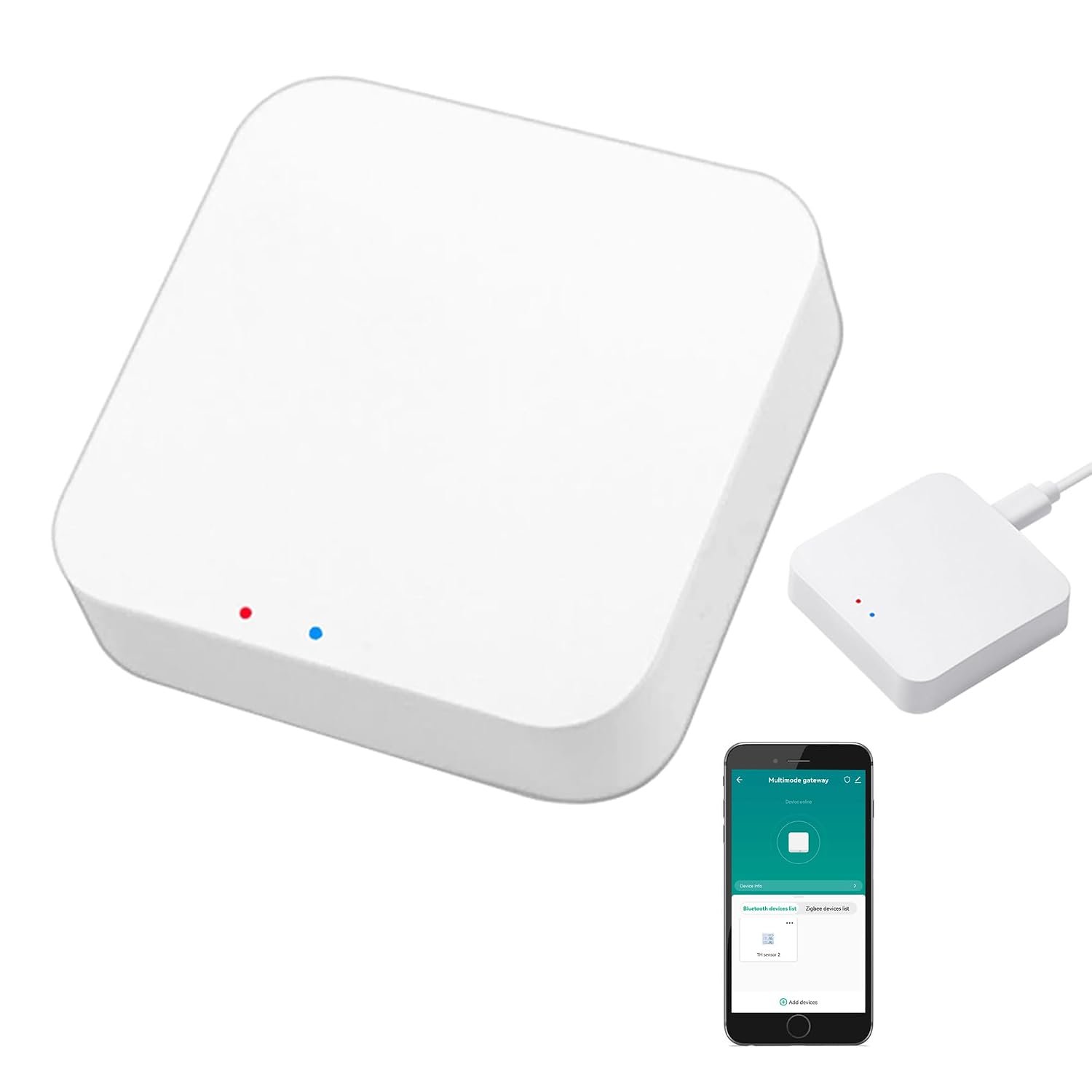
The Smart Multi-Mode Gateway associated with Amazon listing B0D2D89SFQ is designed to address this problem by acting as a central bridge for compatible Tuya Smart and Smart Life devices. The device supports Zigbee 3.0 and Bluetooth Mesh communication and connects the smart-home network to a 2.4 GHz Wi-Fi network. Product documentation identifies the gateway as a control center for compatible smart-home devices and lists Tuya Smart/Smart Life as its application environment.
The important limitation is also contained in the product title itself: this gateway is intended for Tuya-compatible devices. It should not be treated as a universal smart-home hub capable of automatically connecting every Zigbee, Bluetooth, or Wi-Fi product from every manufacturer.
That distinction matters because protocols such as Zigbee and Bluetooth describe how devices communicate, but compatibility also depends on the software ecosystem, device profiles, firmware, and manufacturer implementation.
The gateway’s purpose is therefore best understood as a central communication layer for a Tuya-based smart home. Compatible sensors, switches, lights, plugs, and other devices can communicate with the hub, while the hub provides app-based management, automation, grouping, and supported voice-control integration with platforms such as Amazon Alexa and Google Home.
This article explains how a Tuya multi-mode gateway works, what Zigbee 3.0 and Bluetooth Mesh contribute to the system, how the Smart Life and Tuya Smart apps fit into the setup, and what users should consider before building a smart-home network around this type of gateway.
What Is a Smart Multi-Mode Gateway?
A smart gateway is essentially a communication bridge.
Instead of every smart device connecting directly to the home’s Wi-Fi router, compatible devices can communicate with a hub using another wireless protocol. The gateway then connects those devices to the home network and the associated smart-home application.
The B0D2D89SFQ gateway is designed around this concept.
Available product documentation identifies support for:
- Zigbee 3.0
- Bluetooth Mesh
- 2.4 GHz Wi-Fi
- Tuya Smart
- Smart Life
- Alexa voice control
- Google Home integration
- Smart-home automation
- Group control
- Remote app management
The product listing specifically describes support for up to 128 Tuya smart-home devices, including examples such as Zigbee motion sensors, leak detectors, finger robots, door sensors, thermometers, and window sensors.
The gateway itself is a small device. Supplier documentation lists the model as Multi-mode Gateway-1, with dimensions around 1.8 × 1.79 × 1.1 inches and a weight of approximately 1.41 ounces.
Its compact size allows it to be placed near networking equipment or in another suitable indoor location without taking up much space.
Key Features
Zigbee 3.0 Connectivity
Zigbee is one of the primary communication technologies supported by the gateway.
Zigbee is designed specifically for low-power smart-home and IoT devices. It is commonly used by sensors, switches, lighting products, plugs, buttons, and similar accessories.
Compared with connecting every device directly to Wi-Fi, a Zigbee-based architecture can provide a separate wireless network for compatible smart-home accessories.
The gateway acts as the central connection point between those devices and the Tuya ecosystem.
This can be particularly useful when a household contains several sensors.
For example, a smart home might have:
- Door sensors
- Window sensors
- Motion sensors
- Water-leak sensors
- Temperature sensors
- Smart switches
- Smart plugs
- Zigbee lights
Instead of requiring every sensor to maintain an individual Wi-Fi connection, compatible Zigbee devices communicate with the gateway.
Bluetooth Mesh Support
The gateway also supports Bluetooth Mesh, specifically Bluetooth SIG Mesh according to Tuya’s multi-mode gateway documentation.
Bluetooth Mesh is different from ordinary Bluetooth connections used for headphones or keyboards.
Bluetooth Mesh is designed for networks containing multiple devices that can participate in a distributed communication structure.
This can be useful for smart-home accessories where several Bluetooth-based devices need to operate together.
The gateway allows supported Tuya Bluetooth Mesh devices to become part of the broader Tuya smart-home environment.
The important word is supported.
A generic Bluetooth device should not automatically be assumed to work with this hub. The product is designed around Tuya-compatible Bluetooth Mesh devices rather than general-purpose Bluetooth accessories.
2.4 GHz Wi-Fi
The gateway uses 2.4 GHz Wi-Fi for its connection to the home network.
The available documentation identifies Wi-Fi support using 802.11b/g/n at 2.4 GHz.
This is common for smart-home hubs because 2.4 GHz Wi-Fi generally provides useful coverage through walls and is widely supported by consumer routers.
When setting up the gateway, the smartphone and router configuration should be compatible with the required 2.4 GHz network.
Users with routers that combine 2.4 GHz and 5 GHz networks under one name may occasionally need to adjust network settings during setup, depending on how the router handles device onboarding.
Tuya Smart and Smart Life App Support
The gateway is designed to work with the Tuya Smart and Smart Life applications.
These applications provide the software interface for adding compatible devices, organizing rooms, creating automations, and controlling connected equipment.
The product information states that the hub supports adding devices, device reset, third-party control, group control, and remote management through the app.
This means the gateway is not intended to be configured entirely through physical buttons.
Instead, the app becomes the central management interface.
A typical smart-home structure could look like this:
Smartphone → Tuya/Smart Life App → Gateway → Zigbee/Bluetooth Mesh Devices
The gateway therefore acts as the communication bridge between the application and compatible low-power devices.
Remote App Control
One of the practical benefits of a network-connected gateway is remote access.
Once the system has been configured correctly, compatible devices can be managed through the Tuya Smart or Smart Life application even when the user is away from home. Product documentation describes remote control as one of the gateway’s functions.
For example, a user could check a connected smart plug or lighting device while away from the house.
Remote access can also be useful for automation management.
However, remote functionality depends on the gateway, network connection, cloud service, and the particular device being controlled. A local device does not automatically become independently controllable from anywhere simply because it is connected to a hub.
Voice Control Through Alexa and Google Home
The gateway is designed to integrate with voice assistants including Amazon Alexa and Google Home.
The product information describes voice control for supported connected devices, including examples such as switching a smart plug or controlling a finger robot.
This allows compatible devices to become part of a voice-controlled home.
For example, a user might create a voice command that activates a group of lights or switches a compatible smart plug.
The exact voice commands depend on the device type and how it appears in the connected voice platform.
Not every Tuya device necessarily exposes every function through Alexa or Google Home.
Support for Up to 128 Tuya Devices
The product listing states that the gateway can support up to 128 Tuya smart-home devices.
A capacity figure like this can be useful for understanding the intended scale of the hub.
It suggests that the gateway is designed for more than a handful of accessories.
A larger installation might include:
- Multiple rooms
- Several motion sensors
- Door and window sensors
- Smart plugs
- Lighting controls
- Temperature sensors
- Leak detectors
- Other compatible Tuya accessories
However, the maximum device count should not be interpreted as a guarantee that every installation will behave identically at that maximum.
Wireless range, network conditions, device types, firmware, automation complexity, and the physical layout of a building can all influence practical performance.
Smart Home Automation
Automation is one of the main reasons to use a gateway instead of controlling every smart device individually.
Tuya’s multi-mode gateway architecture supports local linkage and scenario-based control, allowing connected devices to interact based on predefined conditions.
This means one device can become the trigger for another.
For example:
Motion detected → hallway light turns on
Or:
Door opened → selected light activates
Or:
Water leak detected → notification is generated
Or:
Temperature condition met → compatible smart device changes state
The actual automation options depend on the devices involved and what functions the Tuya platform exposes for them.
Group Control
The system also supports grouping compatible devices.
Grouping can simplify management when several devices serve the same purpose.
For example, multiple lights in a room can be organized into a group.
Instead of opening each device individually, a user can control the group as a unit.
This can be useful in larger homes where there are many individual devices.
Local Smart-Home Linkage
Tuya’s multi-mode gateway architecture includes support for local linkage and scenario control.
Local automation can be useful because some device-to-device actions do not necessarily need to depend on a remote server for every individual interaction.
However, the term “local” should be interpreted carefully.
The gateway still operates as part of the Tuya ecosystem, and not every feature or remote-access function is necessarily independent of internet or cloud services.
Users who specifically require completely offline smart-home operation should investigate the individual device and automation requirements rather than assuming that a gateway automatically provides a fully local system.
How It Can Be Used
Smart Lighting
One of the most common applications for a Zigbee and Bluetooth Mesh gateway is smart lighting.
A home can contain compatible bulbs, switches, dimmers, and other lighting controls.
Once connected to the gateway, these devices can be organized through the Tuya or Smart Life app.
For example, a homeowner could create a room called “Living Room” and add compatible lights to that room.
The same approach can be used for:
- Bedroom
- Kitchen
- Hallway
- Office
- Garage
- Outdoor areas
Grouping makes everyday control easier, particularly when several lights need to respond together.
Motion-Activated Lighting
Motion sensors can be used as triggers for automation.
A hallway is a straightforward example.
A Zigbee motion sensor could detect movement, and the gateway could trigger a compatible smart light.
This can reduce the need to manually switch lights on when walking through the area.
A timer can also be incorporated so the light turns off after a defined period.
The exact automation options depend on the sensor and lighting devices being used.
Door and Window Monitoring
Zigbee door and window sensors can provide information about the state of entrances.
A sensor can report whether a door or window is open or closed.
That information can become a trigger for another smart-home action.
For example, opening a door at night could trigger a light in an entrance area.
A user could also configure notifications for selected sensor events.
This does not turn the gateway into a professional security system, but it can provide a layer of household awareness.
Water-Leak Detection
Water-leak sensors are another practical application.
A sensor placed near a washing machine, water heater, sink, or other vulnerable location can detect the presence of water.
The gateway can receive the sensor’s information and use the Tuya system to trigger a notification or another supported automation.
This is particularly useful because water leaks can occur in areas that are not constantly monitored.
Temperature Monitoring
Compatible temperature sensors can report environmental conditions.
This information can be used for monitoring or automation.
For example, a user might create a rule based on a room becoming warmer or colder than a selected threshold.
The gateway does not itself measure room temperature unless an appropriate sensor is connected.
The sensor supplies the environmental information, while the gateway coordinates communication.
Smart Plug Automation
Smart plugs are another common Tuya device category.
A user can connect a compatible plug and then control it through the Tuya or Smart Life application.
A plug can also participate in routines.
For example:
- Turn a lamp on at sunset
- Turn a device off at bedtime
- Activate a compatible appliance at a scheduled time
- Turn a connected device off when leaving home
Users should be cautious when automating appliances that generate heat or have other safety considerations.
Bluetooth Mesh Accessories
The Bluetooth Mesh capability allows compatible Tuya Bluetooth Mesh accessories to participate alongside Zigbee devices.
This can be useful when a household already owns devices based on different supported protocols.
Instead of installing one gateway for Zigbee and another for Bluetooth Mesh, a compatible multi-mode gateway can provide a common control point.
This is one of the main reasons multi-mode hubs exist.
Creating Smart-Home Scenes
Scenes can make a collection of individual devices behave like a coordinated system.
Imagine a “Leaving Home” scene.
It could potentially:
- Turn selected lights off
- Switch compatible plugs off
- Check selected sensor states
- Trigger other supported actions
A “Night” scene could:
- Turn off living-room lights
- Leave a hallway light on
- Activate selected security-related sensors
- Adjust other compatible devices
An “Arrive Home” scene could:
- Turn on selected lights
- Activate a smart plug
- Trigger another compatible device
The actual actions available depend on the Tuya devices connected to the gateway.
Scenes should be designed around realistic household routines rather than automating everything simply because automation is available.
Who It May Be Suitable For
Tuya Smart and Smart Life Users
The clearest audience for this gateway is people building their smart home around Tuya-compatible devices.
The product explicitly states that it supports Tuya Smart devices, and third-party listings emphasize that non-Tuya devices are not supported.
If a household already contains compatible Tuya sensors, switches, plugs, or lights, a multi-mode gateway can provide a centralized connection point.
Users With Zigbee and Bluetooth Mesh Devices
The gateway can be useful when a smart home contains both supported Zigbee and Bluetooth Mesh accessories.
Instead of treating the protocols as completely separate systems, the gateway brings them into the same Tuya environment.
People Building a Larger Smart Home
The stated capacity of up to 128 compatible devices makes the gateway relevant to larger installations than a simple single-device setup.
It can be used as the central point for multiple rooms and different categories of smart-home accessories.
Users Interested in Voice Control
People who already use Alexa or Google Home may appreciate the ability to expose compatible Tuya devices to those platforms.
Voice control can be especially useful for lighting, plugs, and simple device functions.
Users Who Want App-Based Remote Access
The Tuya Smart and Smart Life applications allow compatible devices to be managed from a smartphone, including remote access where supported.
This can be useful for users who want to check or control devices while away from home.
Important Things to Consider
Tuya Compatibility Is the Main Limitation
The most important consideration is the phrase “ONLY Support Tuya Smart Devices.”
The gateway should not be treated as a general-purpose Zigbee coordinator that automatically supports every Zigbee product on the market.
A device can use Zigbee 3.0 and still not be supported by this particular gateway’s Tuya environment.
The same principle applies to Bluetooth Mesh.
Before purchasing additional devices, verify that the specific product is compatible with the Tuya ecosystem and the gateway.
Zigbee Is Not the Same as Universal Zigbee Compatibility
Zigbee is a communication protocol, but compatibility also involves profiles, device types, manufacturer implementations, and ecosystem software.
This distinction is important when building a smart home.
A generic Zigbee sensor may communicate using Zigbee technology but still not appear correctly in a Tuya-based system.
Therefore, the safest approach is to verify compatibility at the device level.
Bluetooth Mesh Is Not Ordinary Bluetooth
A common misunderstanding is that Bluetooth support means the gateway can connect to any Bluetooth product.
It cannot.
The product is designed for compatible Bluetooth Mesh smart-home devices within the Tuya ecosystem.
A Bluetooth speaker, wireless keyboard, smartphone accessory, or other ordinary Bluetooth product is not automatically compatible.
2.4 GHz Wi-Fi Is Required
The gateway uses 2.4 GHz Wi-Fi. Product documentation specifically identifies 2.4 GHz 802.11b/g/n networking.
Users should therefore ensure that their router provides a suitable 2.4 GHz network during setup.
If a router is configured to hide or disable its 2.4 GHz band, the gateway may not be able to complete normal setup.
Network Configuration Matters
Smart-home hubs can be sensitive to unusual router configurations.
During setup, it is generally useful to ensure:
- The router is operating normally.
- The 2.4 GHz network is available.
- The smartphone has access to the same home network.
- The gateway receives stable power.
- The Tuya or Smart Life app has the necessary permissions.
The product manual also describes setup procedures involving the local Wi-Fi environment and gateway pairing.
Wireless Range Is Not Unlimited
The gateway communicates wirelessly with connected devices.
Walls, floors, metal structures, furniture, electrical equipment, and building construction can influence signal quality.
Zigbee networks can use mesh behavior where supported devices relay communication, but the exact behavior depends on the device types in the network.
Battery-powered sensors may not function as routers in the same way powered Zigbee devices can.
Therefore, a larger house may require careful device placement.
The Maximum Device Count Is Not a Guarantee of Performance
The stated 128-device capacity describes the intended supported device count.
It should not be interpreted as a promise that every possible combination of 128 devices will have identical performance.
A network containing 128 simple sensors may behave differently from one containing numerous devices generating frequent events and complicated automations.
Smart-home architecture should be designed according to the actual requirements of the installation.
Internet Access and Local Automation Are Different
Tuya’s gateway architecture supports local linkage and remote control, but those are not the same thing.
A local automation can sometimes allow devices to respond to each other through the gateway without requiring a remote cloud interaction for every event.
Remote app access, however, normally involves network and cloud connectivity.
If internet service is unavailable, some local functionality may remain available while remote control becomes unavailable.
Users who require complete offline operation should investigate the specific local capabilities of every device and automation.
Power Requirements
Available documentation identifies a DC 5V/1A power requirement for the gateway.
The product package is described as including the gateway, a USB power supply line, and a user manual, although package contents can vary by seller or regional listing.
The gateway should be placed where a suitable power source is continuously available.
Indoor Operating Conditions
The available product documentation lists an operating temperature range and humidity range intended for indoor environments. One manual source identifies approximately -10°C to 55°C and 10%–90% relative humidity without condensation.
The hub should therefore be protected from water, excessive humidity, and unsuitable environmental conditions.
Comparison of General Smart-Home Gateway Categories
Multi-Mode Gateway vs Wi-Fi-Only Hub
A Wi-Fi-only smart-home hub communicates primarily with devices that connect through Wi-Fi.
A multi-mode gateway can connect supported devices using different protocols, such as Zigbee and Bluetooth Mesh, while using Wi-Fi as the connection to the home network.
This can reduce the need to use separate gateways for different supported device types.
The trade-off is that compatibility becomes more dependent on the ecosystem and device profiles.
Zigbee Gateway vs Bluetooth Mesh Gateway
A Zigbee-only gateway is focused on Zigbee devices.
A Bluetooth Mesh gateway focuses on compatible Bluetooth Mesh products.
A multi-mode gateway combines both communication methods in one device.
For a household that uses only Zigbee products, the additional Bluetooth Mesh capability may not be important.
For a mixed Tuya installation, however, having both protocols available can simplify the overall architecture.
Smart Hub vs Individual Device Connections
Without a central hub, some smart devices connect directly to Wi-Fi.
This can be convenient for a small installation.
However, a larger number of Wi-Fi devices can create a more complicated network and may increase the number of devices communicating directly with the router.
A gateway-based architecture places many compatible low-power devices behind a central controller.
This can provide a more structured network design.
Tuya-Centered Gateway vs Universal Smart-Home Hub
A Tuya-centered gateway is designed around the Tuya ecosystem.
A broader smart-home hub may support devices from many manufacturers and protocols.
The advantage of the Tuya approach is that devices designed for the ecosystem can be managed through a common application and automation framework.
The limitation is equally important: devices outside the supported ecosystem may not work.
For this particular product, ecosystem compatibility should be treated as a primary purchasing consideration.
Setting Up the Gateway
The setup process generally starts with the network and mobile application.
Available manuals describe connecting the gateway to power and configuring it with the home’s 2.4 GHz network.
A typical setup sequence is:
- Place the gateway in a suitable indoor location.
- Connect it to a stable 5V power source.
- Make sure the home’s 2.4 GHz Wi-Fi network is available.
- Install Tuya Smart or Smart Life.
- Create or sign into the appropriate account.
- Add the gateway through the application.
- Follow the pairing instructions.
- Add compatible Zigbee devices.
- Add compatible Bluetooth Mesh devices.
- Organize devices into rooms or groups.
- Create scenes and automation rules.
- Connect Alexa or Google Home if required.
- Test individual devices before creating complicated automations.
Starting with a small number of devices can make troubleshooting easier.
If a problem occurs, it is much simpler to determine whether the gateway, network, or device is responsible when only a few accessories have been added.
Building a Smart Home Around the Gateway
A sensible approach is to begin with the devices that solve actual household problems.
For example, a basic system might start with:
- One gateway
- Two door sensors
- One motion sensor
- Two smart lights
- One smart plug
Once these devices are functioning correctly, additional sensors and controls can be added.
This gradual approach helps users understand how the Tuya ecosystem works before introducing dozens of devices.
It also makes automation easier to maintain.
A smart-home system can become difficult to troubleshoot when a single complex automation depends on many different sensors, switches, and conditional rules.
Security and Privacy Considerations
A smart-home gateway connects physical devices to digital services, so account security matters.
The gateway should be treated as part of the home’s connected infrastructure.
Useful practices include:
- Use a strong and unique account password.
- Keep the Tuya Smart or Smart Life app updated.
- Install available gateway firmware updates.
- Review connected third-party services.
- Remove old or unused devices.
- Avoid giving unnecessary account access.
- Use a secure home Wi-Fi network.
- Review automation rules periodically.
Voice assistant integrations also introduce another layer of account management.
If Alexa or Google Home is connected to the Tuya account, anyone with appropriate access to that smart-home ecosystem may be able to control compatible devices.
Users should therefore review permissions and connected accounts regularly.
Maintenance and Troubleshooting
Smart-home gateways generally require little physical maintenance, but software maintenance can matter.
If a device stops responding, several areas should be checked:
Check Power
Confirm that the gateway has stable power and that its status indicators behave normally.
Check Wi-Fi
Verify that the 2.4 GHz network is functioning correctly.
Check Device Range
If a Zigbee or Bluetooth Mesh device is far from the gateway, moving it closer can help determine whether range is involved.
Check Compatibility
Confirm that the device is still supported by the Tuya ecosystem and that it was added using the appropriate device category.
Check Firmware
Firmware updates can address stability, compatibility, and feature issues.
Re-Pair the Device
If a sensor or switch was previously connected to another gateway, it may need to be reset before joining the new system.
The available manual documentation includes device-adding and pairing procedures for the gateway.
Frequently Asked Questions
What is the Smart Multi-Mode Gateway?
It is a smart-home gateway designed to connect compatible Tuya devices using technologies such as Zigbee 3.0 and Bluetooth Mesh while using 2.4 GHz Wi-Fi to connect the gateway to the home network.
Does it support Zigbee 3.0?
Yes. Zigbee 3.0 is one of the gateway’s primary supported communication technologies.
Does it support Bluetooth Mesh?
Yes. The product supports Bluetooth Mesh for compatible Tuya smart-home devices. Tuya’s multi-mode gateway architecture specifically references Bluetooth SIG Mesh.
Does it work with Alexa?
The product listing identifies Alexa voice-control support for compatible Tuya devices.
Does it work with Google Home?
Yes, compatible Tuya devices can be integrated with Google Home according to the product information.
Can it connect any Zigbee device?
No. This is an important limitation. The product is specifically designed for Tuya-compatible devices, so generic Zigbee compatibility should not be assumed.
Can it connect ordinary Bluetooth devices?
No. The Bluetooth capability is intended for compatible Bluetooth Mesh smart-home devices, not general Bluetooth accessories such as headphones or keyboards.
Which app does the gateway use?
The product information identifies both Tuya Smart and Smart Life as supported applications.
Does the gateway use 2.4 GHz Wi-Fi?
Yes. Available documentation identifies 2.4 GHz 802.11b/g/n Wi-Fi.
How many devices can it support?
The product listing states support for up to 128 Tuya smart-home devices.
Can I control my devices remotely?
Compatible devices can be managed remotely through the Tuya Smart or Smart Life application when the required network and cloud connectivity are available.
Can devices communicate automatically with each other?
Yes. Tuya’s multi-mode gateway architecture supports device linkage, local scenarios, and group control for compatible devices.
Can a motion sensor trigger a light?
A compatible Tuya motion sensor can be used as a trigger for a compatible smart light through the automation system. The exact options depend on the devices and available automation functions.
Can it be used for door sensors?
Yes. Compatible Tuya Zigbee door and window sensors are among the types of devices identified for this gateway.
Can it work with leak detectors?
Yes. The product listing specifically gives leak detectors as an example of compatible Tuya smart-home devices.
Is the gateway wireless?
The gateway communicates wirelessly with compatible Zigbee and Bluetooth Mesh devices and connects to the home network through 2.4 GHz Wi-Fi according to the available documentation.
Does it require an Ethernet cable?
Available documentation for this model describes Wi-Fi networking rather than requiring an Ethernet connection. The setup documentation specifically references connection to a 2.4 GHz Wi-Fi router.
Does it work without internet?
Some local device linkage can operate through the gateway, and Tuya describes local linkage and scenario control in its multi-mode gateway architecture. However, remote app access and cloud-dependent features require network connectivity.
Is this a universal smart-home hub?
No. It is more accurate to describe it as a Tuya-focused multi-mode gateway. Its support for Zigbee and Bluetooth Mesh does not mean that every device using those protocols will work.
Is it suitable for a large smart home?
The stated capacity of up to 128 compatible Tuya devices makes it suitable for installations that extend beyond a few devices. Actual performance depends on the device mix, wireless environment, network conditions, and automation complexity.
Conclusion
The Smart Multi-Mode Gateway associated with Amazon ASIN B0D2D89SFQ is designed to serve as a central bridge for a Tuya-based smart home. Its combination of Zigbee 3.0, Bluetooth Mesh, and 2.4 GHz Wi-Fi allows compatible devices using different communication technologies to participate in a shared smart-home environment.
Its main role is not to replace every smart-home platform but to connect compatible Tuya devices through the Tuya Smart or Smart Life ecosystem. Supported devices can include sensors, smart lights, smart plugs, switches, leak detectors, door sensors, temperature sensors, and other compatible accessories.
The multi-mode architecture can be useful when a household contains both Zigbee and Bluetooth Mesh products. Rather than managing completely separate systems, compatible devices can be organized through one application and used together in scenes and automation rules.
Voice integration adds another control option. Compatible Tuya devices can be exposed to platforms such as Amazon Alexa and Google Home, allowing supported functions to be operated through voice commands.
The gateway also supports remote app management, grouping, device linkage, and automation. Tuya’s own multi-mode gateway architecture emphasizes local linkage and scenario control, making the gateway more than a simple wireless bridge.
At the same time, compatibility is the most important consideration. The product is specifically intended for Tuya Smart devices, and Zigbee 3.0 or Bluetooth Mesh compatibility alone does not guarantee that a device from another ecosystem will work.
For anyone building a Tuya-centered smart home, understanding that distinction can make the system easier to plan. Start with compatible devices, verify the required protocol, establish reliable 2.4 GHz Wi-Fi coverage, and then build automations gradually around genuine household needs.
Leave a Reply