Introduction
As smart home systems become more sophisticated, the number of connected devices inside a home can grow quickly. A few security cameras can turn into a larger network that also includes motion sensors, doorbells, alarms, and other smart devices. Managing each device separately can make it harder to organize recordings, notifications, and everyday automation.
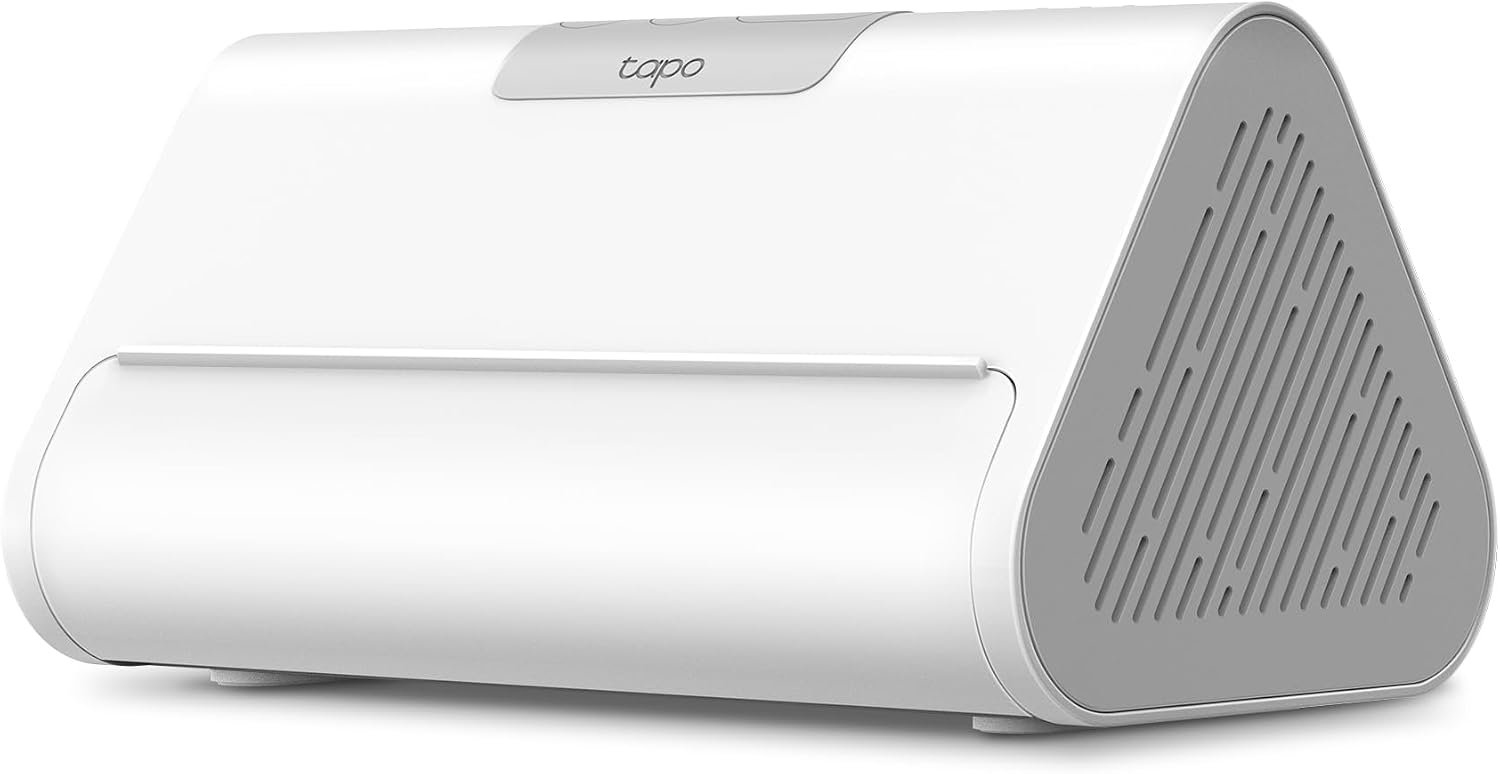
The Tapo CentralHub H500 is designed to serve as a central point for compatible Tapo smart devices. Rather than functioning only as a conventional smart-home hub, it combines device management, local video storage, enhanced camera intelligence, connectivity options, and monitoring features in one unit.
One of its notable functions is the ability to provide additional AI capabilities to compatible Tapo cameras. According to TP-Link, the H500 can add features such as facial recognition and enhanced person, pet, and vehicle detection to supported cameras. The company also states that the system can connect up to 16 Tapo cameras and 64 Tapo sensors, although compatibility depends on the specific devices and regional version.
The H500 also includes 16GB of built-in eMMC storage and supports expansion with a separately purchased 2.5-inch SATA HDD or SSD with a capacity of up to 16TB. This makes the device particularly relevant for households that want to maintain local recordings rather than depending entirely on individual camera storage or cloud-based recording services.
Understanding what a central home hub actually does is important before adding one to a smart-home system. The H500 is not simply a storage box or Wi-Fi accessory. It is intended to coordinate compatible cameras and sensors, provide a centralized interface, process certain AI-related functions, and offer additional ways to view and manage security events.
This guide explores the Tapo H500 from an informational perspective, including its major features, how it can be used, storage considerations, camera AI functions, connectivity, compatibility, and the situations in which a centralized smart-home system may make practical sense.
What Is the Tapo H500?
The Tapo H500 is a Smart HomeBase and CentralHub designed for the Tapo ecosystem. Its role is to provide a central location for compatible cameras and sensors rather than requiring every device to operate as an isolated component.
TP-Link describes the H500 as capable of connecting up to 16 Tapo cameras and 64 Tapo sensors. It supports wireless connections for cameras and devices while also offering Ethernet connectivity to the router. Depending on the regional version, the system uses different wireless frequencies for communication with cameras, sensors, and the router.
The H500 can therefore be thought of as a bridge between several parts of a smart-home system:
- Security cameras
- Smart sensors
- Local video storage
- AI-powered camera features
- Home automation
- Mobile monitoring
- HDMI-based viewing
- Compatible Matter devices
- Certain third-party IP cameras through ONVIF support
This centralized approach can be useful when a home has multiple cameras and sensors because it creates a single location for managing a larger portion of the system.
Key Features
Centralized Smart-Home Management
One of the primary purposes of the H500 is to centralize compatible Tapo devices.
TP-Link states that the H500 can connect up to 16 Tapo cameras and 64 Tapo sensors. This provides considerably more capacity than a hub intended only for a few sensors or a smaller camera setup.
For example, a home might have:
- One camera covering the front entrance
- Another camera overlooking a driveway
- A camera monitoring a backyard
- A doorbell camera
- Motion sensors
- Door and window sensors
- Other compatible smart-home accessories
Instead of treating every device as an independent system, the H500 can act as the central point connecting these components.
Actual compatibility should still be checked before purchasing additional devices because support can vary according to hardware version, firmware, device model, and region. TP-Link maintains compatibility information and firmware documentation for the H500.
Enhanced AI Features for Compatible Cameras
One of the more interesting aspects of the H500 is its ability to extend AI-related functionality to supported Tapo cameras.
TP-Link describes features including facial recognition and detection of people, pets, and vehicles. The company explains that facial recognition can help identify familiar and unfamiliar faces and organize relevant events.
This can change the way security notifications are interpreted.
A conventional motion alert might simply indicate that movement occurred. An AI-assisted system can potentially provide more context, such as whether the detected subject was a person, pet, vehicle, or recognized face.
That distinction can be useful because not every movement around a property represents the same level of importance.
For example, a camera facing a driveway may detect:
- A family member arriving
- A delivery vehicle
- A neighbor walking past
- A pet moving through the area
- An unfamiliar person
Having more detailed classification can help organize events and reduce the number of alerts that require immediate attention.
However, AI detection should not be interpreted as infallible. Lighting, camera angle, distance, obstructions, image quality, movement, and environmental conditions can affect detection and recognition performance.
Facial Recognition
Facial recognition is one of the features highlighted by TP-Link for the H500.
The general concept is straightforward: compatible camera footage can be analyzed to help distinguish recognized faces from unfamiliar ones. This can make event searching and notification management more organized.
For a household with recurring visitors, family members, or employees, face-based categorization may provide additional context compared with basic motion detection.
At the same time, facial recognition involves sensitive personal information. Users should consider who has access to the Tapo account, how recognition data is managed, and the privacy expectations of people whose faces may be captured by cameras.
The feature should therefore be treated as a convenience and organizational tool rather than as a perfect identification system.
Local Storage
The H500 includes 16GB of built-in eMMC storage and provides an expansion slot for a 2.5-inch SATA HDD or SSD with support for storage capacities up to 16TB. The additional drive must be purchased separately.
Local storage can be useful for several reasons.
First, it provides a centralized location for compatible camera recordings. Instead of relying exclusively on individual memory cards inside cameras, recordings can be managed through the HomeBase.
Second, larger storage capacity can be useful when several cameras are recording regularly. Video files accumulate quickly, particularly when multiple cameras operate continuously or generate frequent motion events.
Third, local storage can help reduce dependence on subscription-based cloud recording plans. TP-Link specifically markets the H500 around local storage without monthly storage fees, although individual camera features and services can have their own requirements.
It is important to distinguish local storage from a complete replacement for every cloud service. Compatibility and feature availability can vary between devices and services, so users should check the requirements for their particular cameras.
Expandable Up to 16TB
The H500’s storage architecture is particularly relevant for larger camera systems.
The built-in 16GB eMMC storage provides the starting point, while a separately purchased 2.5-inch SATA HDD or SSD can expand the available capacity to as much as 16TB.
A larger drive can be useful for households that want to retain security footage for longer periods.
For example, a small installation with occasional motion events may not generate recordings as quickly as a multi-camera system covering entrances, outdoor areas, and common spaces.
Storage requirements depend on several factors:
- Number of cameras
- Resolution
- Recording mode
- Frame rate
- Amount of motion activity
- Compression settings
- Retention period
- Number of events generated
Therefore, a 16TB drive does not automatically mean a specific number of days of recording. Actual retention varies according to how the system is configured.
HDMI Video Output
The H500 includes an HDMI port that allows compatible video feeds to be displayed on a larger screen. TP-Link describes the feature as supporting viewing on a monitor or television and states that up to four live views can be displayed on larger screens.
This can be practical in situations where a dedicated monitoring screen is preferred over constantly checking a phone.
For example, a homeowner could use a monitor in a home office to view multiple camera feeds, while still using the Tapo application for remote access and configuration.
A larger screen can also make multi-camera monitoring easier because several feeds can be visible at once.
110dB Built-In Alarm
The H500 includes a built-in alarm rated at 110dB. TP-Link also describes the device as being able to function as a chime when connected with compatible Tapo doorbells.
An integrated alarm provides another way for the hub to participate in security notifications.
For example, a compatible automation could use an event detected by a camera or sensor to trigger an audible notification.
The appropriate use of the alarm depends on the household and the configuration of connected devices. Users should avoid assuming that every camera or sensor event will automatically activate the alarm, because behavior depends on compatibility and automation settings.
Wi-Fi and Ethernet Connectivity
The H500 supports multiple connection methods.
TP-Link specifies 5GHz Wi-Fi for communication with the router and 2.4GHz Wi-Fi for cameras in its US specifications, while also providing Ethernet connectivity. Regional versions can use different sub-1GHz frequencies for supported devices.
This gives users flexibility when planning the physical installation.
A wired Ethernet connection can be useful when the H500 is positioned close to a router and a stable wired connection is preferred. Wi-Fi can be more convenient when running an Ethernet cable is impractical.
For video-heavy applications, connection quality matters. The hub’s position, router performance, wireless congestion, walls, distance, and network configuration can all affect communication between devices.
Matter Compatibility
The H500 supports Matter, a smart-home interoperability standard designed to make compatible smart devices easier to integrate across supported ecosystems.
Matter can be useful when a household uses smart products from multiple manufacturers. Instead of relying exclusively on one company’s proprietary ecosystem, Matter-compatible devices can potentially participate in a broader smart-home environment.
Compatibility is still device-specific, however. A product being Matter-compatible does not necessarily mean every feature of that product will become available through every Matter ecosystem.
ONVIF Support
TP-Link’s product documentation also identifies ONVIF support as part of the H500’s compatibility approach. ONVIF can be particularly relevant to users who operate IP cameras from multiple manufacturers.
This can provide additional flexibility compared with a hub designed exclusively around a single camera brand.
However, ONVIF interoperability does not guarantee that every advanced camera feature will work across brands. Basic video streaming and more advanced functions can have different compatibility requirements.
How the Tapo H500 Can Be Used
Managing a Multi-Camera Home
One straightforward use case is a home with several security cameras.
Instead of checking individual camera applications, a centralized system can provide a unified environment for viewing and managing connected cameras.
A possible arrangement could include cameras covering:
- Front door
- Garage
- Driveway
- Backyard
- Side entrance
- Indoor common areas
The H500 can serve as the central HomeBase for supported Tapo cameras, with the system designed to accommodate up to 16 cameras.
Organizing Security Events
When multiple cameras generate alerts throughout the day, searching through individual notifications can become inconvenient.
The H500’s centralized approach is designed to make event management easier. TP-Link describes features such as daily security reports, event tags, and tools for finding relevant events within the Tapo application.
AI classifications can add another layer of organization.
Instead of treating every motion event identically, users can potentially distinguish events involving people, pets, vehicles, or recognized faces.
Monitoring a Property on a Larger Screen
The HDMI output can be useful for users who prefer a dedicated display.
A television or monitor can provide a larger overview of multiple cameras, particularly when the goal is to keep an eye on several areas at once.
This can be useful in:
- Home offices
- Workshops
- Small businesses
- Reception areas
- Security monitoring stations
- Homes with multiple exterior cameras
Building a Sensor-Based Security System
The H500 is not limited to cameras.
TP-Link states that it can connect up to 64 Tapo sensors, allowing cameras and sensors to form part of a broader smart-home ecosystem.
Sensors can provide information that cameras alone cannot.
For example, a door sensor can identify whether a door was opened, while a motion sensor can detect movement in a particular area. Cameras can then provide visual context.
Combining these types of devices can create a more structured security system.
Who It May Be Suitable For
Households With Multiple Tapo Cameras
The H500 becomes more relevant as the number of compatible cameras increases.
Someone using only one basic camera may not need a dedicated central hub. A household with several cameras, however, may benefit from having centralized storage, event organization, and device management.
Users Interested in Local Video Storage
The H500 may also appeal to users who prefer maintaining security footage locally.
Its 16GB internal storage and support for an additional SATA HDD or SSD provide a way to create a larger local video storage system.
Users should still review individual camera and service requirements before assuming that every recording feature works entirely locally.
Smart-Home Enthusiasts
People who are gradually building a larger smart home may find a centralized hub easier to manage than a collection of disconnected devices.
The combination of Tapo devices, Matter compatibility, sensors, cameras, and supported IP cameras gives the H500 a broader role than a simple camera recorder.
Small Shops and Workspaces
A small business or workshop may use multiple cameras and sensors to monitor entrances, storage areas, equipment, or customer-facing spaces.
The H500 can provide a centralized monitoring environment, although businesses should also consider privacy requirements, local surveillance laws, employee policies, and appropriate data retention practices.
Important Things to Consider
Compatibility Should Be Checked Before Installation
Not every Tapo device necessarily provides the same functionality when connected to the H500.
TP-Link maintains compatibility information and regularly releases firmware updates, so checking the current compatibility list is important before purchasing additional equipment.
Hardware versions can also vary by region.
AI Detection Is Not Perfect
AI-powered recognition can make security systems more informative, but it should not be treated as a guarantee.
Factors such as:
- Low light
- Strong backlighting
- Distance
- Obstructions
- Camera angle
- Fast movement
- Similar-looking faces
- Weather
- Image quality
can influence detection results.
For security-critical situations, AI notifications should be considered one layer of information rather than the sole source of decision-making.
Facial Recognition Requires Privacy Awareness
Facial recognition introduces additional privacy considerations.
Before enabling the feature, households should consider whether everyone who may be recorded understands how the system is being used.
For businesses and rental properties, additional privacy or surveillance obligations may apply depending on the location and circumstances.
Storage Capacity Is Not the Same as Retention Time
A large storage drive does not automatically translate into a fixed number of days of recordings.
Retention depends on the number of cameras, recording settings, resolution, motion activity, and other factors.
Users should therefore select storage capacity based on their actual recording strategy.
Network Quality Matters
Although the H500 supports both wired and wireless networking, the quality of the underlying network remains important.
A hub positioned far from the router may experience connectivity challenges if wireless conditions are poor. Multiple cameras also generate more traffic than a single camera.
For installations with several cameras, planning the router location, Ethernet availability, Wi-Fi coverage, and camera placement can make a meaningful difference.
Regional Versions Matter
TP-Link notes that hardware availability and specifications can vary by region. The H500’s sub-1GHz frequencies, for example, differ between regions such as the US/Australia and Europe/UK.
This is particularly important when purchasing a device from an international marketplace.
The version intended for the user’s region should be verified before installation.
Comparison of General Smart-Home Categories
Central Smart HomeBase vs Individual Camera Storage
A camera with its own memory card can be sufficient for a small installation.
However, individual storage becomes more complicated when several cameras are involved. Each camera may have its own storage configuration and event management.
A centralized HomeBase moves more of that management into one location.
The trade-off is that the hub becomes an important component of the overall system.
Local Storage Hub vs Cloud-Centered Security System
A cloud-centered system generally sends recordings to remote servers, while a local-storage hub can keep compatible recordings within the home.
Local storage can offer greater control over where recordings are retained and can reduce dependence on recurring cloud storage plans.
Cloud services, on the other hand, can provide advantages for remote access, off-site redundancy, and simplified hardware management.
Neither approach automatically eliminates every security or privacy consideration.
The H500’s design gives users a local-storage option while still supporting connected smart-home functionality.
Multi-Protocol Hub vs Single-Ecosystem Hub
A single-ecosystem hub can provide a relatively straightforward experience when all devices come from the same product family.
A broader hub that supports technologies such as Matter and ONVIF can offer more flexibility when users want to combine devices.
The additional flexibility can also introduce compatibility questions. A device may technically connect while not supporting every manufacturer-specific function.
Setting Up a Tapo H500 System
A typical installation begins with positioning the H500 in a suitable location near the home’s networking equipment and power source.
Users can then connect the hub to the network through a compatible connection method and add supported Tapo devices through the Tapo application.
For a larger installation, it is useful to plan the system before adding every device.
Consider:
- Where each camera will be installed.
- Which areas require continuous monitoring.
- Where sensors should be positioned.
- Whether Ethernet or Wi-Fi is preferable for the HomeBase.
- How much video storage is required.
- Whether a SATA HDD or SSD should be added.
- Which users should have account access.
- Which AI recognition features are appropriate.
- Whether HDMI monitoring is useful.
- Which automation rules should generate alerts.
Firmware should also be kept current. TP-Link continues to publish H500 firmware updates, including updates that address compatibility, stability, and specific feature behavior.
Practical Storage Planning
Storage planning is one of the most important considerations for a multi-camera system.
Suppose a household has four cameras. Each camera may produce a different amount of footage depending on its location.
A camera pointed at a quiet entrance may generate relatively few motion events. A camera facing a busy street could generate considerably more activity.
Similarly, continuous recording creates a different storage requirement from motion-based recording.
When planning storage, consider:
- Number of cameras
- Recording mode
- Resolution
- Activity level
- Desired retention period
- Whether important clips are exported elsewhere
The H500’s support for up to 16TB of additional SATA storage gives larger installations substantial room for expansion, but the appropriate capacity depends on the actual configuration.
Security and Data Protection
A smart-home hub can become an important part of the home’s digital infrastructure, particularly when it stores camera footage.
TP-Link specifies 128-bit AES encryption with SSL/TLS for the H500. The company also highlights multilayer encryption and account security features on its product documentation.
Users should complement these technical protections with good account practices.
Useful measures include:
- Using a strong, unique account password
- Enabling available account security features
- Keeping firmware updated
- Limiting account access to trusted users
- Avoiding unnecessary sharing of camera credentials
- Reviewing connected devices periodically
- Placing the HomeBase in a secure physical location
A secure smart-home system involves both the hardware and the way the system is configured and maintained.
Frequently Asked Questions
What is the Tapo H500 used for?
The Tapo H500 is a Smart HomeBase designed to centralize compatible Tapo cameras, sensors, storage, and smart-home functions. TP-Link states that it can connect up to 16 cameras and 64 sensors.
Does the Tapo H500 improve camera AI?
For compatible Tapo cameras, the H500 can provide enhanced AI functions such as facial recognition and person, pet, and vehicle detection. The exact functions available depend on camera compatibility and software support.
How much storage does the Tapo H500 have?
The H500 includes 16GB of built-in eMMC storage. It also supports a separately purchased 2.5-inch SATA HDD or SSD with capacity up to 16TB.
Does the H500 require a hard drive?
No. The unit includes 16GB of built-in storage. A separate HDD or SSD is an optional expansion for users who need more local storage capacity.
Can the Tapo H500 connect multiple cameras?
Yes. TP-Link specifies support for up to 16 Tapo cameras. The exact compatibility of individual camera models should be verified before installation.
Can it connect smart sensors?
Yes. TP-Link specifies support for up to 64 Tapo sensors.
Does the Tapo H500 support Matter?
Yes. The H500 is marketed as Matter-compatible and is designed to work with compatible Matter-certified smart-home products.
Can the H500 connect to a TV or monitor?
The H500 includes HDMI output, allowing compatible camera views to be displayed on a larger screen. TP-Link states that up to four live views can be displayed on larger screens.
Does the H500 work with Wi-Fi?
Yes. The H500 supports Wi-Fi connections as well as Ethernet networking. TP-Link’s US specifications list 5GHz Wi-Fi for the router connection and 2.4GHz Wi-Fi for cameras.
Does it replace a router?
No. The H500 is a smart-home central hub, not a conventional home router. It connects to the home’s existing network and provides centralized management for compatible smart devices.
Can the H500 replace cloud storage?
It can provide local storage for compatible camera systems, which can reduce the need for some cloud storage services. However, users should check the specific requirements of their cameras and desired features rather than assuming that every cloud-dependent function is replaced.
Is facial recognition guaranteed to identify everyone correctly?
No. Facial recognition systems can make mistakes, and performance can vary according to image quality, lighting, viewing angle, distance, and other conditions. It should be treated as an assistance feature rather than a guaranteed identification method.
Does the H500 work with cameras from other brands?
TP-Link’s product materials identify ONVIF support, which can allow certain IP cameras from other manufacturers to be integrated. However, compatibility and available features can vary between camera models and protocols.
Does the H500 have a built-in alarm?
Yes. TP-Link specifies a built-in 110dB alarm and describes additional doorbell chime functionality.
Can the H500 be used without Ethernet?
The H500 supports Wi-Fi connectivity, giving users an alternative to a wired network connection. For installations involving several cameras, users should consider network conditions and choose the connection method that provides appropriate stability.
Conclusion
The Tapo CentralHub H500 is designed for users who want to move beyond a collection of individually managed smart cameras and sensors toward a more centralized home-security and automation system.
Its role combines several functions: local video storage, camera management, enhanced AI capabilities, sensor connectivity, smart-home integration, HDMI monitoring, and alarm functionality. TP-Link specifies support for up to 16 cameras and 64 sensors, while local storage can be expanded from the built-in 16GB eMMC to a separately purchased SATA HDD or SSD of up to 16TB.
The AI capabilities are particularly relevant for households that want more context from security notifications. Facial recognition and person, pet, and vehicle detection can help organize events more intelligently than basic motion alerts, although AI recognition should always be viewed as an assistive technology rather than a perfect identification system.
The H500 can also make sense for users interested in local video storage, larger multi-camera installations, Matter-compatible smart-home devices, or viewing several camera feeds on a dedicated monitor.
As with any smart-home platform, compatibility should be checked carefully before expanding the system. Regional hardware versions, firmware, camera models, storage requirements, network conditions, and privacy considerations can all influence how the system works in a particular installation.
For someone planning a Tapo-centered smart home with multiple cameras and sensors, understanding these factors can help determine whether a centralized HomeBase fits the intended setup.
Leave a Reply